Create and assign
Create a work order when a finding needs an owner: a defect or trend that needs intervention, work found during a review, a planned service visit, or a customer request. A good record gives the receiving team enough plant, issue, timing, and impact context to act without chasing you.
Before you start
Section titled “Before you start”You need permission to create work for the plant. Whether you can also assign it depends on your access, not only on your role. Roles and permissions explains who can do what.
Create the work order
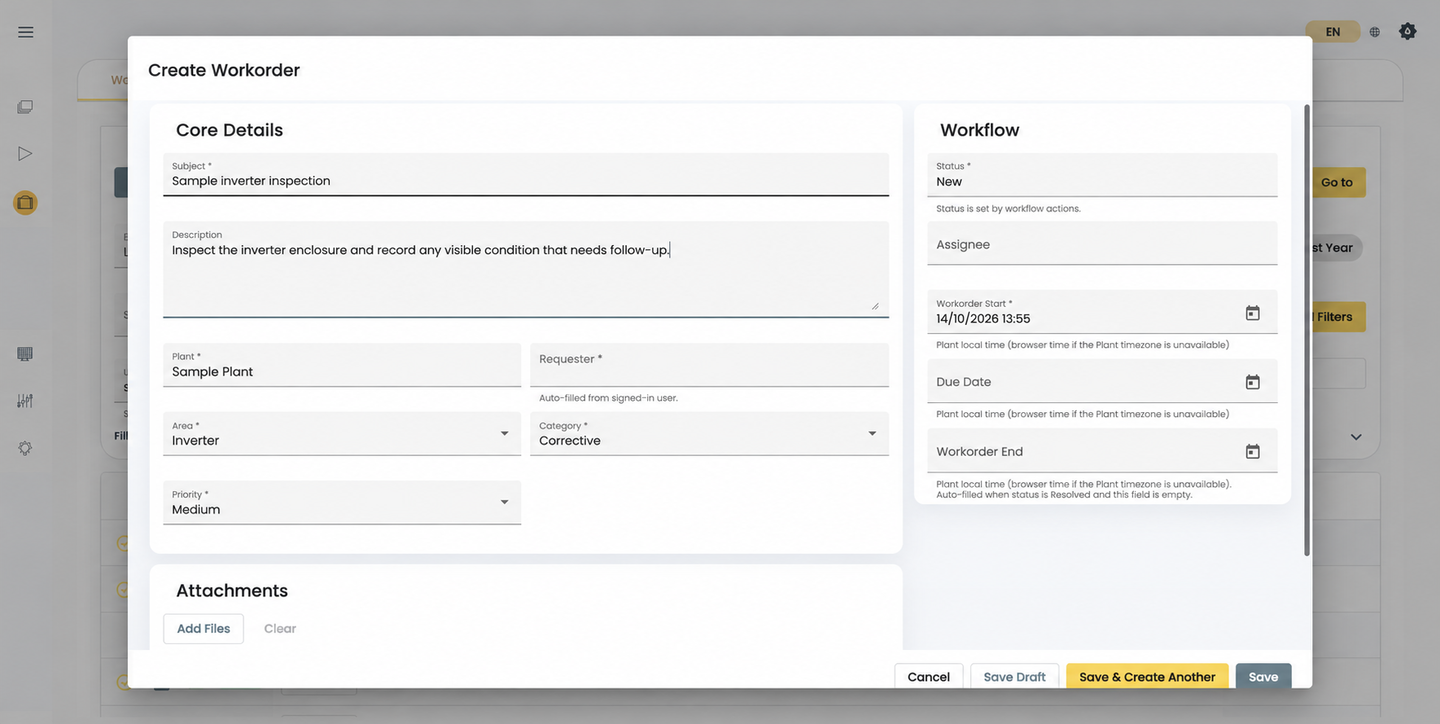
Section titled “Create the work order”- Select the plant.
- Enter a clear subject and description.
- Choose the area, category, and priority.
- Check the requester. SolarSENS fills it in from your signed-in account, and you can’t change it.
- Add start, due, or end dates where they help plan the work.
- Add attachments that help explain the issue.
- Record shutdown context when the work affects a plant, inverter, string, or availability.
- Select an assignee if you already know who owns the work, then save.
Plant, subject, area, category, and priority are required.
There is no general device field on the work order. Name the affected devices in the shutdown context, or in the description when nothing was shut down.
Starting from an alarm
Section titled “Starting from an alarm”Where available, select Add Work Order on an alarm in Alarm Triage to open this form from the alarm. The work order and the alarm stay separate records unless your deployment links them, so copy the alarm’s plant, device, alarm type, and start time into the description so the field team has the full picture.
Assign the work
Section titled “Assign the work”| Assignee | Status |
|---|---|
| None | New |
| Selected | Assigned |
| Cleared again while the work is open | Back to New |
Avoid Save Draft
Section titled “Avoid Save Draft”What you end up with
Section titled “What you end up with”The issue has a structured record with a stable reference, a clear plant, scope, priority, and timing, and a visible owner once assigned. Next, the team adds evidence as they work (Attachments and evidence) and records the outcome (Resolve and close).